Privacy-preserving age verification
AgeKey enables secure, privacy-first age verification without exposing personal data. Built for developers who care about user privacy.
Who is this for?
AgeKey is designed for Age Assurance Providers and platforms that orchestrate multiple verification methods.
If you need to implement age verification into a game or app, consider using OpenAge to implement multiple verification methods with a single integration.
What's AgeKey?
AgeKey is a privacy-preserving age verification system that allows users to prove their age without repeatedly sharing sensitive personal information. Think of it as a digital credential stored securely on a user's device that can verify age thresholds (such as "over 13" or "over 18") without revealing the person's date of birth or identity.
How AgeKey works
AgeKey uses passkey technology (similar to Touch ID or Face ID) to store verified age information on a user's device. Once created, an AgeKey can be used across multiple applications and services, reducing friction in age verification flows.
Key concepts
AgeKey
A passkey stored on the user's device that contains verified age signals. It proves the user has passed certain age thresholds without exposing their exact age or date of birth.
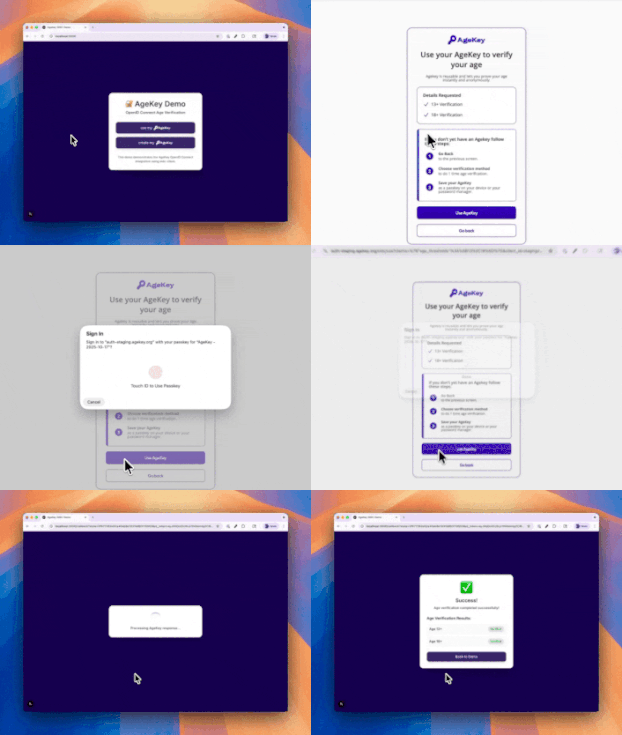
Use AgeKey flow
When a user needs to verify their age and already has an AgeKey saved, they can use this flow to quickly prove they meet age requirements. The user authenticates using their device's passkey system, which can include biometric authentication such as fingerprint scans, Face ID, or other supported methods. This is the faster, returning-user experience.
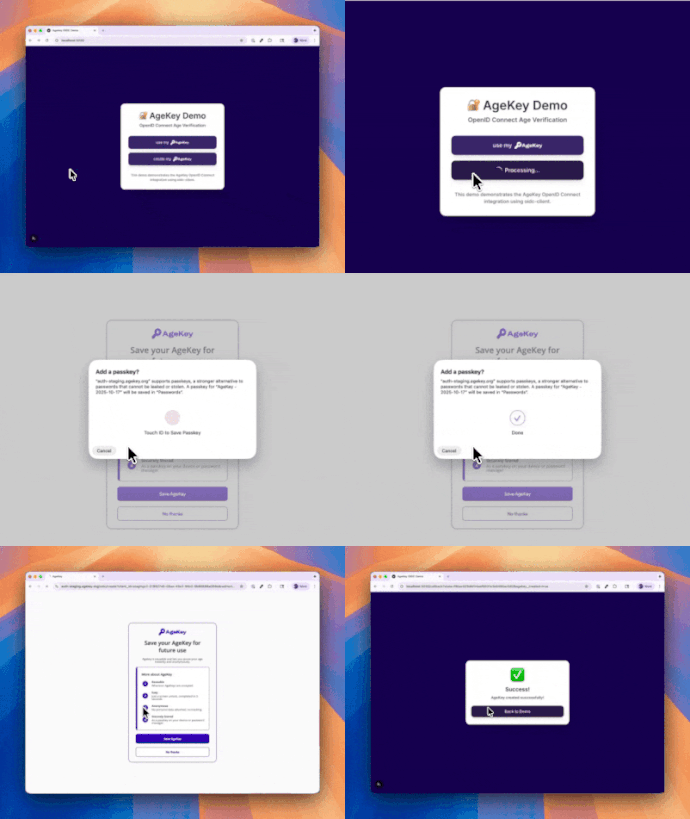
Create AgeKey flow
After completing an age verification with a vendor (such as ID scanning or credit card verification), users can save the result as an AgeKey for future use. The user creates a passkey on their device, which is for future age verifications. This is typically offered as an option after successful verification.
Integration overview
AgeKey uses OpenID Connect (OIDC) standards, so the patterns feel familiar if you've integrated OAuth 2.0 or social login before. Two main flows are available for integration:
1. Use AgeKey (returning users)
- User clicks "Verify with AgeKey"
- Browser redirects to AgeKey service
- User authenticates with their passkey
- Browser returns with a signed token containing age-threshold results
- Your server validates the token and grants access
2. Create AgeKey (new users)
- User completes age verification through your existing vendor
- Your server submits verification details to AgeKey via PAR and receives a short-lived
request_uri - Browser redirects to AgeKey service
- User creates their passkey on-device
- Browser returns to your app (success or decline)
Key benefits
- Privacy First: No PII shared, only boolean results for age thresholds.
- User Control: Users decide when to create and use their AgeKey.
- Cryptographic Security: All results are signed and verifiable with public keys.
- Cross-Platform: Works across multiple applications and services.
Security & privacy
AgeKey is designed with privacy at its core:
- No PII Shared: Your app receives only boolean results (true/false for age thresholds), never raw dates of birth or ID documents
- User Control: Users decide when to create and use their AgeKey
- Cryptographic Verification: All results are signed and can be verified using public keys
- CSRF & Replay Protection: Built-in security measures using
stateandnonceparameters
Prerequisites
Before you begin integration, you'll need:
- Client Credentials: Obtain
client_idandclient_secretfrom AgeKey - Registered Redirect URI: Register the URL where users return after AgeKey flows
- OIDC Client Library: Choose an OpenID Connect certified library for your platform
Key endpoints
Use AgeKey Service:
- Issuer:
https://api.agekey.org/v1/oidc/use - Discovery:
https://api.agekey.org/v1/oidc/use/.well-known/openid-configuration
Create AgeKey Service:
- Issuer:
https://api.agekey.org/v1/oidc/create - Discovery:
https://api.agekey.org/v1/oidc/create/.well-known/openid-configuration - PAR Endpoint:
https://api.agekey.org/v1/oidc/create/par
Verification Keys:
- JWKS:
https://api.agekey.org/.well-known/jwks.json
Choose your flow
Check out the integration guides or contact support.